
Published 29 November 2025
Dear PSOhub Users,
We’re excited to share the latest updates in the End-of-November PSOhub release. This update brings a series of improvements designed to make your experience smoother, faster, and more efficient. From enhanced features to performance upgrades, these changes aim to help you get the most out of PSOhub every day.
Capacity Management
We’ve improved Capacity Management by merging it with Resource Planning into a single, unified dashboard. This change provides a more streamlined view of team availability, workloads, and planning in one place.
As a result, the separate Resource Planning dashboard has been discontinued. All its functionality is now incorporated into the enhanced Capacity Management, giving you a more efficient and intuitive way to manage resources without switching between screens.
Explore the updated dashboard to enjoy faster access to key metrics, improved visualizations, and enhanced filtering options to support smarter resource management.
In Capacity Management, click on the Planning button next to a resource to open their detailed planning.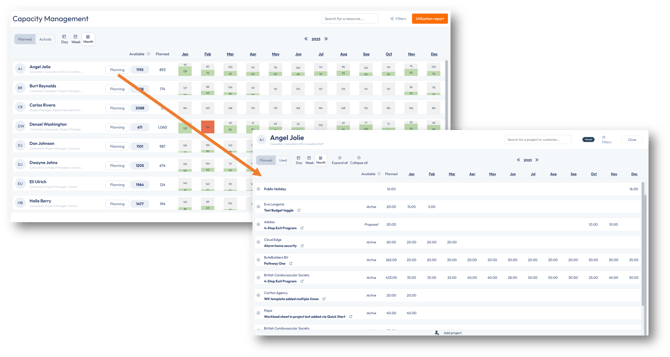
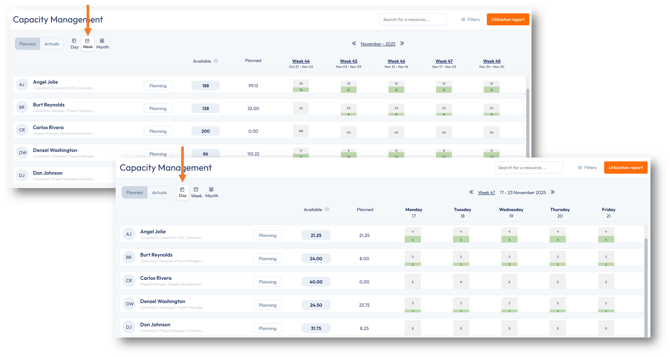
Improved Day & Week Calculations in Capacity Management
We’ve optimized Capacity Management to improve the speed and accuracy of Day and Week calculations. This update ensures that workload and availability metrics are calculated faster, providing a smoother and more responsive experience when planning resources.With these improvements, managing team capacity over days and weeks is now more efficient, allowing you to make informed decisions quickly and confidently.
Search and Tooltips in Capacity Management
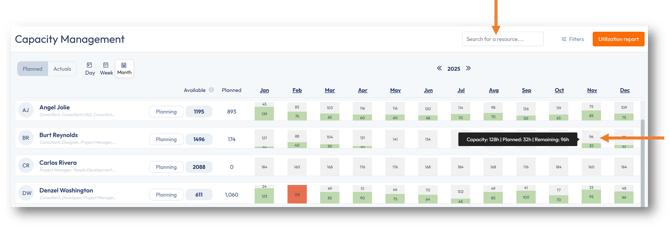
This release introduces enhanced search functionality and contextual tooltips, helping you manage your team’s capacity more efficiently.- Find the right resource instantly, eliminating the need to scroll through lengthy lists.
- Hover over a resource's capacity, and a tooltip will provide instance metrics.
Updated Color Indicators for Capacity Bars
We’ve introduced an improvement to the color-coding in Capacity Management to make resource availability easier to interpret.
When a resource is fully planned up to their capacity (100%)—but not overloaded—the bar will now display green instead of red.
Red is now reserved exclusively for situations where a resource’s capacity has been exceeded.
This update applies across all Capacity Management views, including Day, Week, and Month.
For more information on all changes to Capacity Management, please refer to this article.
Introduction of Rescheduling Resources
We’ve added a powerful new tool to help you keep your project timelines accurate and up to date. The Reschedule button is now available in Project Planning.
This feature allows you to easily realign planning to reflect changes in project scope or scheduling.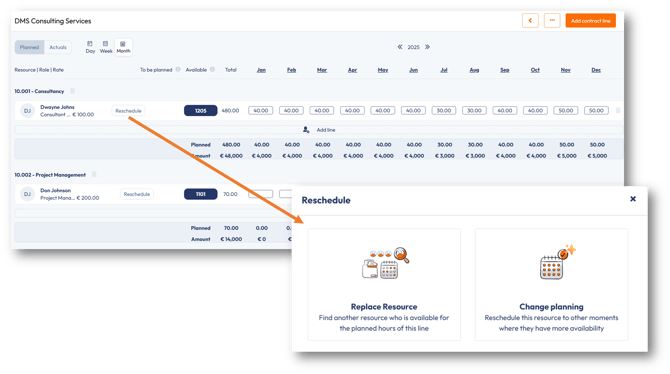
For more information, please refer to this article.
Utilization Report
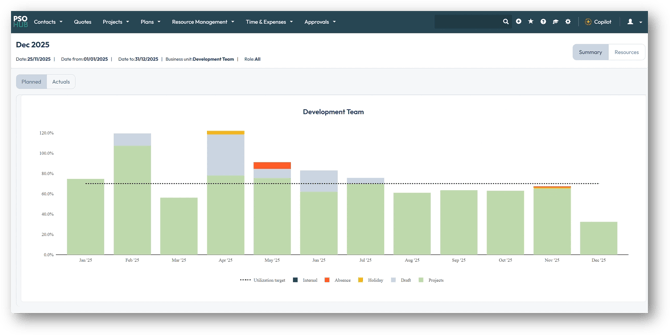
The Utilization Report has been updated to give you better insight into how time is spent across your team. You will now see time spent included in the report, with all categories color-coded for easy visibility, such as Internal, Absence, Holidays, and Projects. Actual hours follow the same category structure as planned hours, making comparisons more consistent.
Fixes
- Improve invoice performance
- Paging in Task Management is restored
- Retrieve planning on the Timesheet Grid
- Negative values on non-discount contract lines are correctly sent to Exact Online
- The project grid filter for the customer column is now set to be a text filter instead of a dropdown
- The project type will now be sorted alphabetically in dropdowns
If you have any questions or suggestions, feel free to reach out to our support team via the live chat.
Best regards,
The PSOhub Team