Released 24 January 2026
Dear PSOhub user,
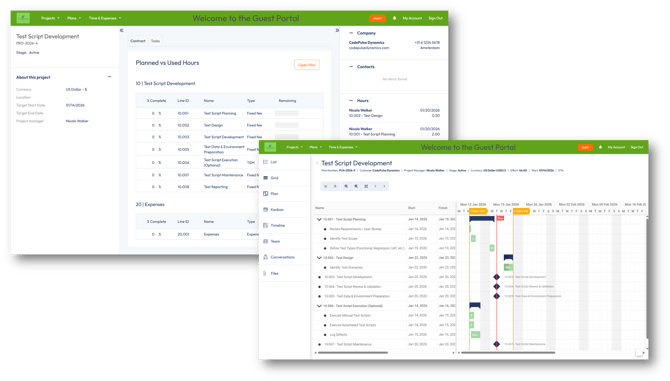
We are pleased to announce the launch of the all-new PSOhub Guest Portal, designed to improve collaboration with external stakeholders while providing a more intuitive and streamlined experience for project guests.
This release introduces a refreshed interface and enhanced capabilities that make it easier for customers and visitors to access relevant project information and engage more effectively with your organization.
What’s New
Enhanced Guest Portal Experience
The redesigned Guest Portal offers a cleaner, more intuitive interface, improving usability and navigation for external users.
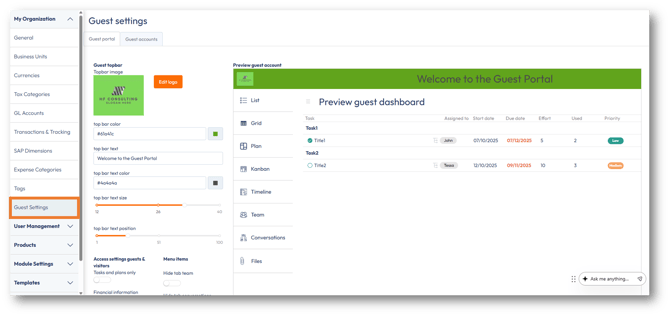
New Guest Settings
Organizations now have greater control over the Guest Portal experience, including:
-
Custom branding to align with your corporate identity
-
Streamlined access management for guest users
-
Configurable menu options to tailor what guests can see and access
The new Guest Settings are available under the My Organization menu, making it easy for administrators to configure and manage the guest experience.
Guest Account Limits
Guest access is subject to plan-specific limits:
-
Enterprise: Up to 100 guest accounts
-
Professional: Up to 30 guest accounts
Together, these improvements enable a more personalized, professional, and secure experience for your customers and project stakeholders.
For more information on how to set up guest accounts and personalize the portal, please visit this article.
Minor fix
-
Notification Settings in the Dutch language
The notification settings are correctly displayed for users with Dutch language preferences. The settings now reflect the correct labels as expected.
If you have any questions or suggestions, feel free to reach out to our support team via the live chat.
Best regards,
The PSOhub Team