
Released: 14 February 2026
Dear PSOhub user,
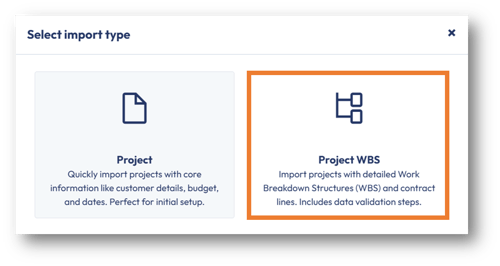
This Valentine’s Day, we’re introducing a more structured way to import your Work Breakdown Structure (WBS) product data, built on commitment, validation, and clean data relationships.
You now have two options:
-
Standard Import – unchanged.
-
Advanced WBS Import – new, validation-driven import for WBS contract lines.
🌹 What’s New
The Advanced WBS Import allows you to import:
-
Quantity
-
Unit Price
-
Cost Price
-
Billing frequency dates
-
Product-based contract lines
📌 All imports are based on an existing Contract Template.
📌 No contract template = no import. We believe in strong foundations.
🔐 Built-In Validation
Before anything is finalized:
-
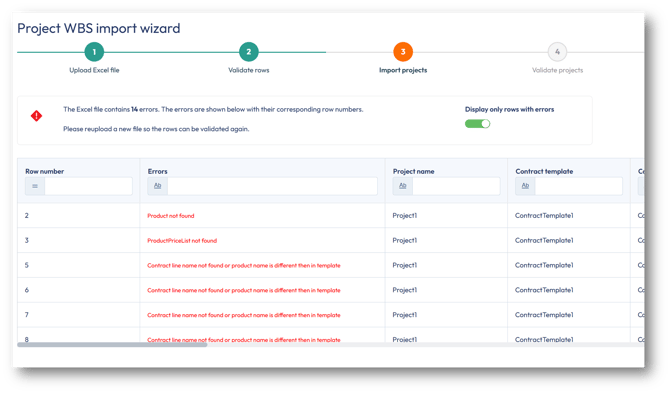
The file is validated
-
Errors are shown per row
-
Invalid rows must be corrected
-
Inline edits are allowed for specific fields only (QTY, unit price, cost price, contract line description, contract line template).
⚠️Important: Only Product contract lines are supported.
Important Rules
-
The contract template must already exist in PSOhub.
-
Contract template, contract lines, product, and price list must match existing data.
-
Key project fields must remain consistent per project (Business Unit, Currency, Customer, Project Manager, Stage, Type, etc.).
-
Recurring end date requires a valid start date.
- For optimal validation performance, upload a maximum of 20 projects per import. If you need to import more than 20 projects, split the data into smaller batches and process each batch separately.
For more information on how to use this Advanced WBS Import, please refer to the dedicated Help Center article for step-by-step instructions.
Improvements
Additional company fields for custom reporting using OData
We’ve enhanced reporting capabilities by adding new company-level fields to support more detailed analysis and integration scenarios.
The following fields are now available in reporting datasets:
-
Company Registration Number
-
Tax Number
-
SAP Business Partner ID
These additions enable:
-
Improved financial and compliance reporting
-
Easier reconciliation in SAP Business One only
-
More granular filtering and segmentation in reports.
Invoice Paid status with SAP Business One Integration
The synchronization interval between a payment processing and its update in PSOhub has been significantly reduced from 12 hours to 4 hours.
Dynamics 365 opportunity sync – No Customer, No Commitment 💘
We’ve improved the way opportunities are retrieved from Dynamics 365.
Previously, partial searches could return opportunities without a linked customer. Since every opportunity needs a proper match, this sometimes caused issues in follow-up steps due to a missing customer.
From now on, only opportunities with a connected customer will be included.
Because in PSOhub (and on Valentine’s Day), every opportunity deserves a proper match.
If you have any questions or suggestions, our support team is ready to help via live chat.
Wishing you smooth imports and structured projects this Valentine’s Day🌹.
Best regards,
The PSOhub Team