
Released: 4 July 2026
Audience
-
All Users
Dear PSOhub user,
We are excited to introduce PSOhub Lucid — the most significant update to PSOhub to date. Lucid is a complete redesign of the platform, built on three pillars: a simplified user experience, deeper operational and financial insights, and a foundation ready for agentic AI.
Everything shown below ships automatically to all PSOhub users worldwide. No migration is required. Your data model is unchanged, and Lucid is included in every existing license plan at no additional cost.
✨ What's New
Deal to Project — Improved Project Creation
Creating a project from a deal is now faster and more transparent. When creating a project, PSOhub immediately prompts you to select a contract template, a plan template, and a project manager — so every project starts with the right structure in place.
You can toggle between Internal Project and Service Project, configure auto-completion based on task progress, and select team members directly during setup — with the project manager pre-populated from your CRM deal.
PSOhub now shows each step of project creation in real time — no more black box..png?width=670&height=375&name=Release%20notes%20(1).png)
For more information, please refer to this article.
Redesigned Project Layout
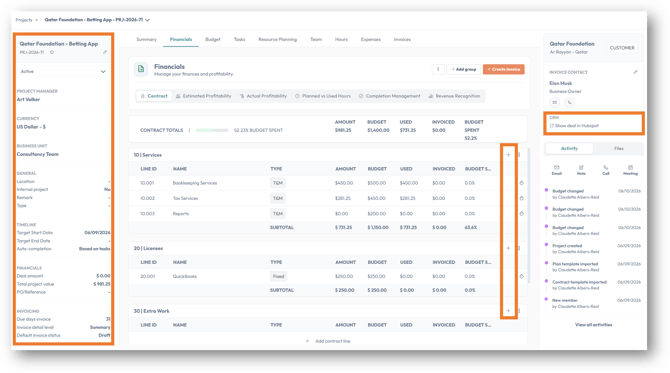
The new left-hand project panel gives you immediate access to:
- Project name and number
- Invoice contacts
- A one-click button to email your project contacts
A direct link back to the originating deal in your CRM is available in the right-hand panel.
Contract lines are now managed inline within their contract group. Click + directly inside the group to add a line — no separate creation step needed.
Budget and margin alerts are more prominent and fully configurable. Set alerts to trigger when, for example, your margin drops below 40%.
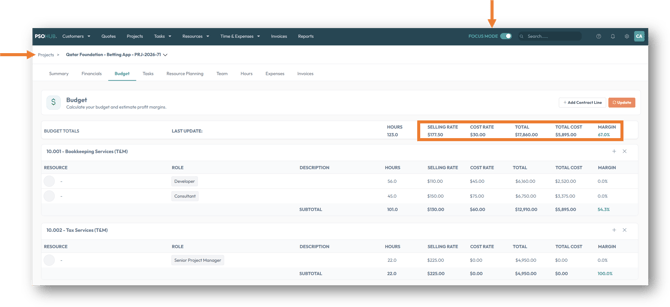
Budget Grid — Combined Sales and Cost Rate View
The Budget Grid now displays sales rate and cost rate in a single combined view. A new Focus Mode hides static side panels so you can work with the full screen. Breadcrumb navigation lets you jump between projects instantly.
The grid shows totals for hours, sales rate, cost rate, and project margin at a glance.
Task Management — Improved Views and Filtering
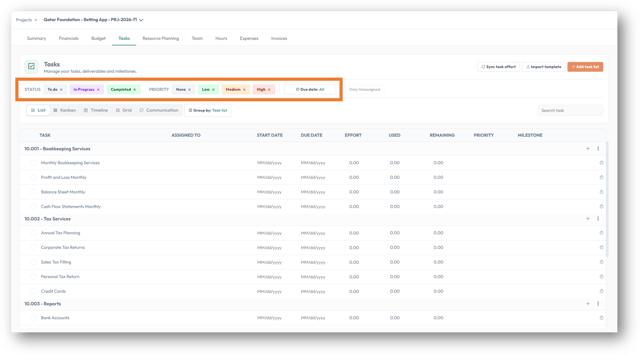
Task management has been redesigned at both the project level and in the global All Tasks view. Enhanced capabilities include:
- List view — filter by status, sort by priority, and group by resource, task list, or due date
- Timeline view — a focused Gantt view with a collapsible left panel
- Grid view — filter by resource and calculate outstanding effort
- Filter by this week, next week, or a custom date range
- View unassigned tasks and assign them directly from the global task list
- Switch between List, Kanban, and Grid views from anywhere
Click on this article for more information.
Resource Planning — Rolling Dates and Inline Budget Editing
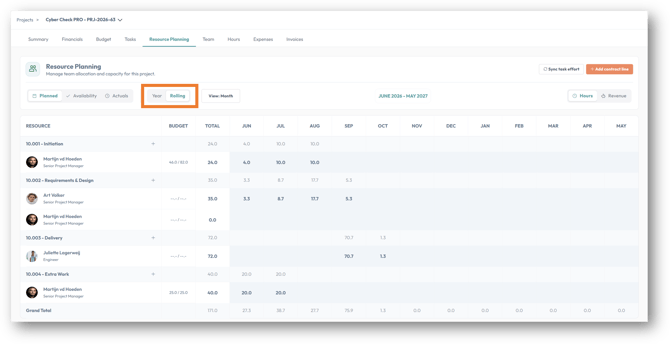
Resource planning now supports rolling dates: instead of only a fixed calendar year view, you can look from the current month forward 12 months. The full-year view remains available for reviewing actuals.
You can now edit budgets directly from the resource planning view — for example, capping a resource at a specific number of hours for a delivery phase — without leaving the planner. Availability is visible before you assign, and budget and planning totals update instantly.
⚠️ OData users: The resource planning data model has been updated to support rolling dates. If you use OData to extract resource planning data, please contact us via live chat or reach out to your dedicated Customer Success Manager before relying on existing OData queries.
Capacity Management — Color-Coded Heat Map
A new color-coded heat map shows utilization across your entire workforce at a glance. The industry benchmark of 70% billable utilization is used as the reference point:
| Utilization | Color |
|---|---|
| Available: Below 70% | Grey |
| Nearly Full: 71–100% | Green |
| Over planned: 101-115% | Orange |
| Critical: >115% | Red |
Filter by team and toggle between percentage view, hours view, planned view, and availability view. Rolling dates are supported here, too.
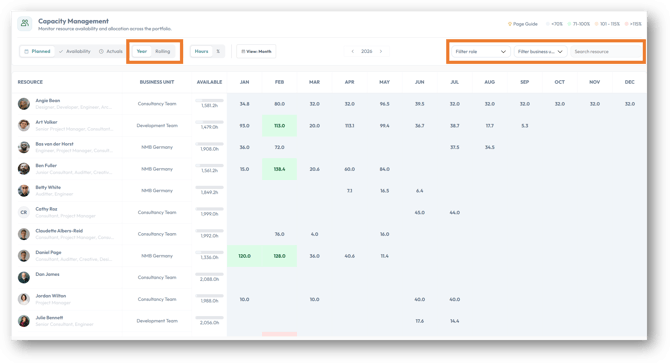 Click here for more information.
My Timesheets — Redesigned Time & Expense Entry
Time registration has been completely redesigned around a single unified timesheet, known as My Timesheets. Key improvements:
- Daily totals show which days still need hours booked
- A fully booked day is visually confirmed
- Daily capacity is drawn from individual capacity settings — not a generic default
- Icons appear only on hover, keeping the interface clean
- A Calendar view is available alongside the grid view, color-coded by hour type
- The left panel shows hours registered vs. target, and your utilization breakdown across billable and internal time
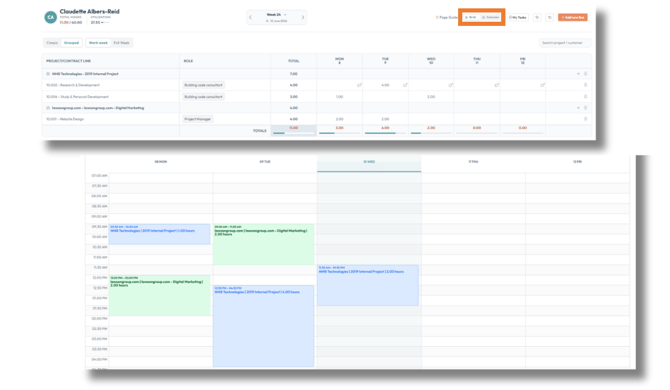
Click here for an introduction to the My Timesheets.
Margin and Profitability View
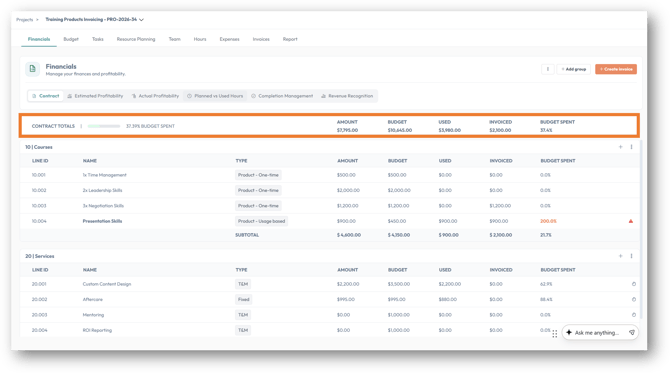
Within any project, you can now see:
- Estimated margin vs. actual profitability
- Planned vs. booked hours and the delta between them
- Revenue recognition based on completion percentage
- Work in Progress (WIP) value
All figures are switchable in one click. Totals are displayed on the top line of the work breakdown structure, making them immediately visible for large and complex projects.
🔧 Improvements
New Reporting Module — Widget-Based Dashboards
Reporting has been rebuilt from the ground up. PSOhub Lucid ships with three pre-configured dashboards:
- Financial Summary
- Resource & Capacity Summary
- Project Portfolio Summary
A data warehouse is included — update on demand and supports historic snapshots.
Custom dashboards will be available shortly after the initial Lucid launch.
For advanced reporting, OData integration remains available.
.png?width=670&height=517&name=PSOhub%20Lucid%20(8).png)
Improved Invoice Creation Flow
The billing view now supports Focus Mode, matching the clean workspace introduced in the Budget Grid. All invoices generated for a project are visible alongside hours spent and expenses, with inline filtering and totals.
When creating an invoice, PSOhub shows each step of the process in real time — including clear error handling when sending to a financial integration such as SAP Business One, Exact Online, or QuickBooks.
.png?width=670&height=186&name=PSOhub%20Lucid%20(9).png)
🎯 Impact
- Faster project setup — contract templates, plan templates, and team members are configured in one step at creation, reducing manual setup time.
- Greater financial visibility — combined budget grid, margin view, WIP, and run rate give project managers and admins a complete financial picture in one place.
- Better resource decisions — the capacity heat map and rolling date planner make it easier to spot overallocation and availability before committing resources.
- Cleaner time registration — the unified timesheet reduces friction and improves daily time entry compliance across your team.
- Proactive risk management — the My Notifications surfaces issues before they escalate, with direct links to the relevant project.
⛔ Discontinued Features
Absence Calendar (User Management Settings)
The Absence Calendar previously found under User Management Settings has been removed. Admins and Controllers can now submit resource absence, holidays, and public holidays directly in Resources > Scheduler.
Standalone Plans
Standalone plans — plans not linked to a project — are no longer supported in PSOhub Lucid. All plans must be linked to a project.
As part of this release, a plan migration is run automatically. Any existing standalone plan is converted and linked to a project with the same number. The migrated plan is renamed Plan Migration to make it easy to identify.
⚠️ Action required: Review any plans named Plan Migration after upgrading to confirm they have been correctly linked to the intended project.
📌 Note: AI features — including voice-based project creation, PDF/SOW import, and AI- assisted time tracking — are not part of this release. These features are planned for the fall update.
If you have any questions or suggestions, our support team is ready to help via live chat.
Best regards,
The PSOhub Team